
Know when a WizIIOT service, database or broker goes down
A Windows watchdog for the WizIIOT services, the platform database and the MQTT broker. It alerts by Event Log, email and SMS, and never touches the services it watches.
What it is
WizIIOT Service Monitor is a Windows service that watches the WizIIOT services on its own machine, the platform database and the Mosquitto MQTT broker. When one of them goes down, it tells people. Every alert goes to the Windows Event Log first. Failures also go out by direct SMTP when configured, and by email and SMS through the WizIIOT Communicator. This release observes and alerts only: by design, it never starts, stops or kills a monitored service.
How it connects
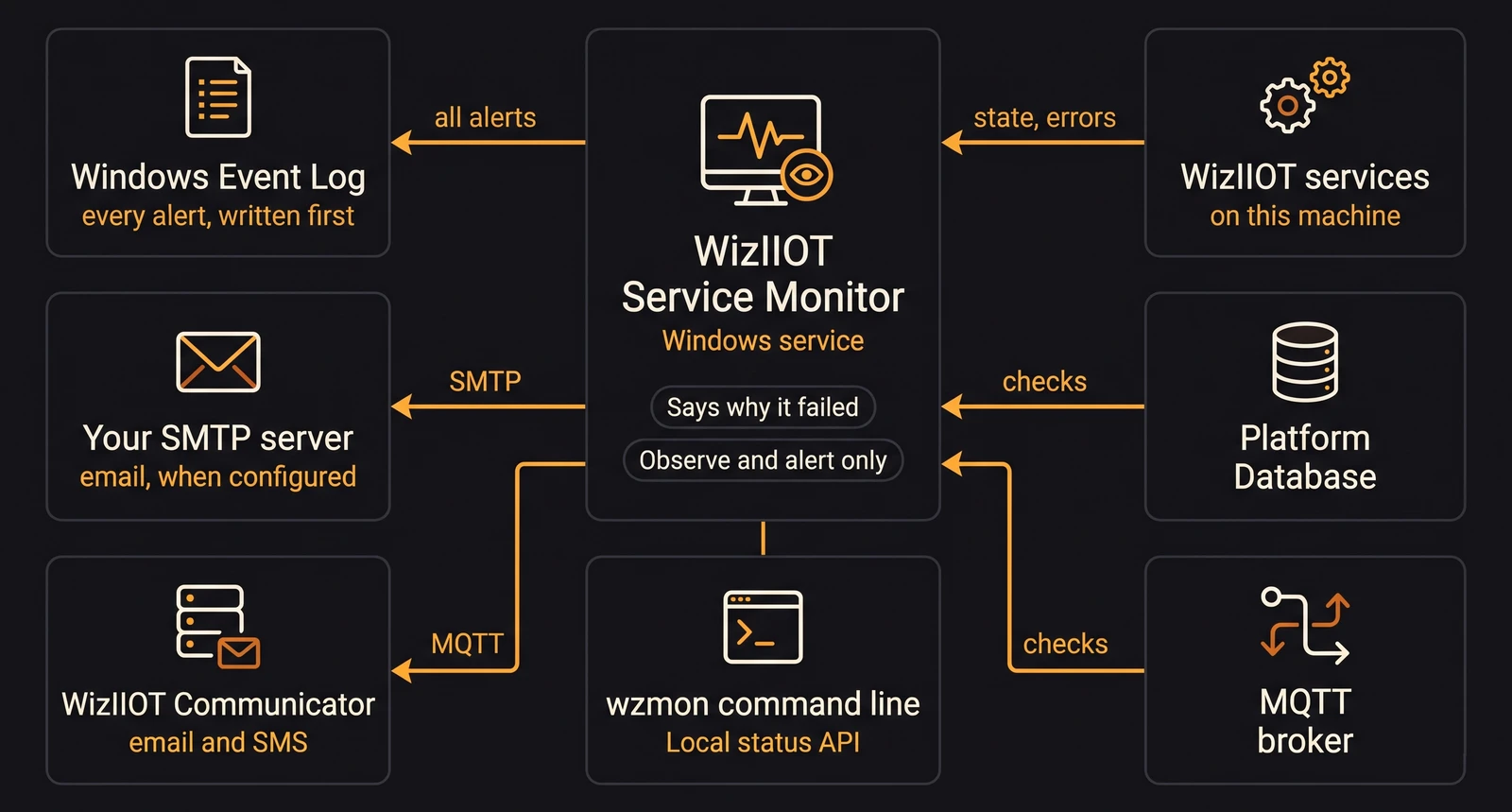
Key benefits
It says why, not just that
It separates a crash, an unexplained stop of an automatic service, a crash loop, a service stuck starting or stopping, and a service caught in a licence-grace restart loop. It reads each service's error output for the stack trace or licence message behind the failure.
Database and broker checked step by step
The platform database (SQL Server or PostgreSQL) is checked in order: service state, TCP connect, login, database state, then a test query. The broker is checked the same way: service state, who owns its port, MQTT connect and broker uptime. Each failure is reported at the step where it happened, and credentials are never shown.
Alerts on more than one path
Every alert is written to the Event Log first. Failures also go by direct SMTP when configured and through the Communicator. Alerts are throttled, but held-back counts ride in the next alert and a critical alert is never dropped. One command sends a test alert on every configured path.
A watchdog that watches itself
Windows recovery restarts, a guardian scheduled task, a deadman thread and a single-instance lock keep the monitor running. Its configuration and state folders are locked to SYSTEM and Administrators, and passwords are stored with Windows DPAPI.
Capabilities
- Watch the WizIIOT Windows services on the machine by service-control state and event feed, read-only
- Classify crash, unexplained stop, crash loop, stuck pending and licence-grace restart loop
- Read each service's error output for the stack trace and licence messages behind a failure
- Check the platform database on SQL Server or PostgreSQL step by step, with errors classified by vendor code
- Check the MQTT broker: service state, port ownership, MQTT connect and broker uptime
- Alert through the Windows Event Log, direct SMTP when configured, and email and SMS via the WizIIOT Communicator
- Read-only local status API, and a 'wzmon' command line with a --check mode whose exit codes suit scripted checks
- Installer wizard that picks up an existing WizIIOT database connection and asks for email and SMS recipients